Go back
Go back
Misa AI — Designing a Voice-Powered Bookkeeping App for Nigerian Small Business Owners
Misa AI — Designing a Voice-Powered Bookkeeping App for Nigerian Small Business Owners
Misa AI — Designing a Voice-Powered Bookkeeping App for Nigerian Small Business Owners
Background story
Background story
Millions of Nigerian small business owners, POS operators, market traders, were tracking finances with memory and notebooks. Not because they didn’t want better tools, but because every bookkeeping app assumed they had time, a quiet environment, and patience to navigate five screens per transaction. Chioma, a POS operator, doesn’t have any of that.
Millions of Nigerian small business owners, POS operators, market traders, were tracking finances with memory and notebooks. Not because they didn’t want better tools, but because every bookkeeping app assumed they had time, a quiet environment, and patience to navigate five screens per transaction. Chioma, a POS operator, doesn’t have any of that.
My role
My role
KudiTraka brought me in as Lead Product Designer to design a voice-powered AI bookkeeping app from scratch. Two previous designers had tried and failed. I led a team of two designers. The brief was clear: build something that fits into the gaps of a busy workday, not something that interrupts it.
KudiTraka brought me in as Lead Product Designer to design a voice-powered AI bookkeeping app from scratch. Two previous designers had tried and failed. I led a team of two designers. The brief was clear: build something that fits into the gaps of a busy workday, not something that interrupts it.
Project Timeline — 12 Weeks
Project Timeline — 12 Weeks
Weeks 1–3 — Discovery Research
Weeks 1–3 — Discovery Research
Weeks 7–9 — User Testing + Iteration Tested with waitlist users
Weeks 4–6 — First Draft + Founder Review
Weeks 4–6 — First Draft + Founder Review
Weeks 10–12 — High-Fidelity + Handoff Final UI
I test with the actual environment in mind
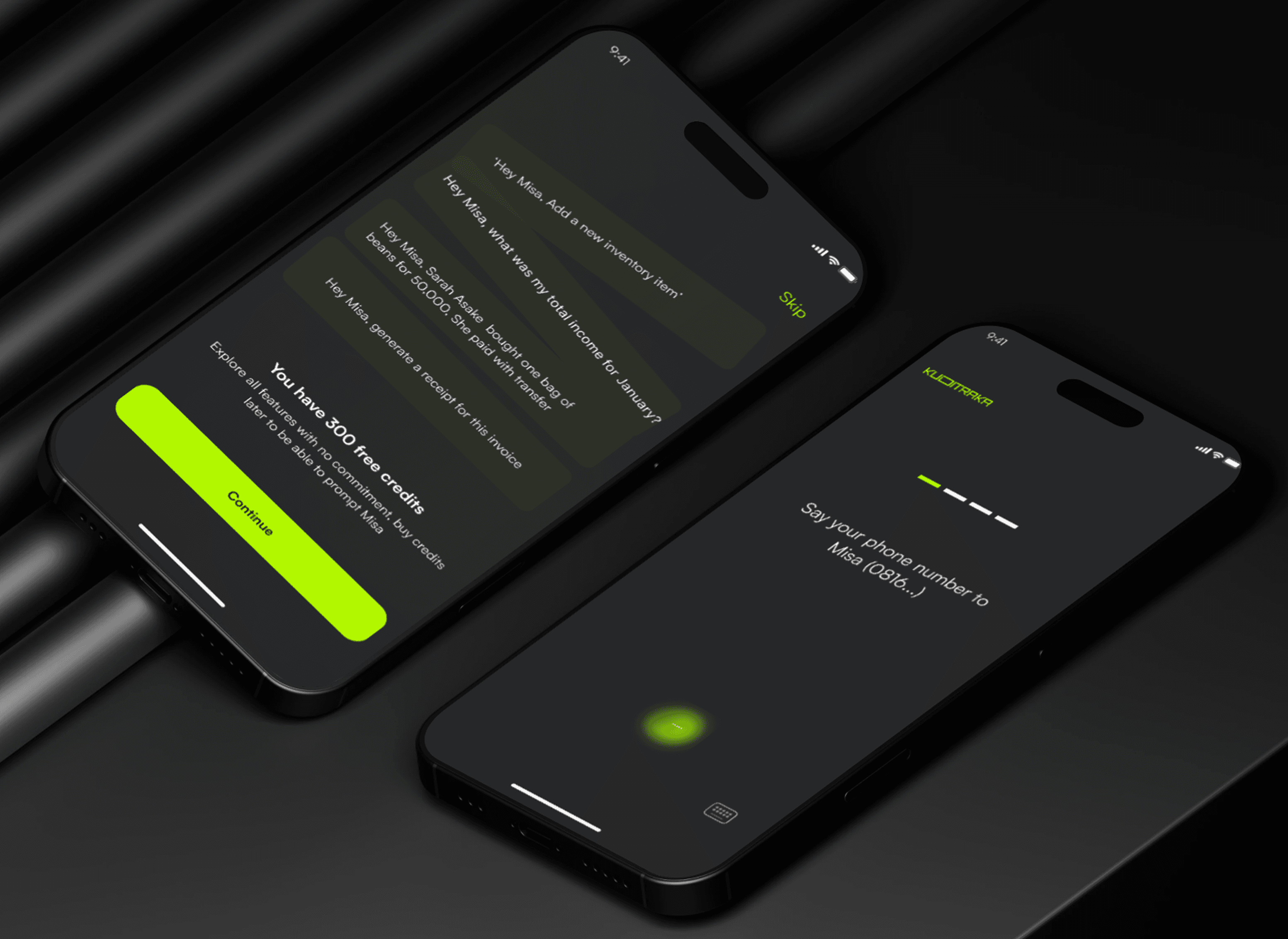
Onboarding mockup screens for Misa AI, designed to create a smooth, human-centered first experience that introduces users to the app effortlessly.
Understanding Before Designing
Before opening Figma, I reached out to a real waitlist user — a POS operator — and walked through her entire workday. I set the research direction and brought my co-designer along so we were building from the same foundation. That conversation unlocked the core insight: the interface couldn’t demand attention, it had to disappear into the workflow. I studied voice UI patterns from Alexa, Siri, and Google Assistant, then made the call that defined the product: voice as the primary input layer, modelled on a phone call. I coordinated design decisions across the team — aligning on conversation flows, component standards, and iteration priorities. I rebuilt a failed onboarding from scratch after founder feedback. After user testing revealed users couldn’t tell if the app had heard them, I led the redesign of the listening indicator and added verbal confirmation. Twelve weeks — research, wireframes, testing, high-fidelity, handoff.
Understanding Before Designing
Before opening Figma, I reached out to a real waitlist user — a POS operator — and walked through her entire workday. I set the research direction and brought my co-designer along so we were building from the same foundation. That conversation unlocked the core insight: the interface couldn’t demand attention, it had to disappear into the workflow. I studied voice UI patterns from Alexa, Siri, and Google Assistant, then made the call that defined the product: voice as the primary input layer, modelled on a phone call. I coordinated design decisions across the team — aligning on conversation flows, component standards, and iteration priorities. I rebuilt a failed onboarding from scratch after founder feedback. After user testing revealed users couldn’t tell if the app had heard them, I led the redesign of the listening indicator and added verbal confirmation. Twelve weeks — research, wireframes, testing, high-fidelity, handoff.
The Design Challenge I Hadn’t Faced Before
Here’s where I had to be honest with myself: I’d never designed a Voice User Interface before.
Most of my instincts as a designer are visual, I think in layouts, hierarchies, and states. But voice is none of that. It’s sequential, conversational, and unforgiving of confusion. There’s no “back button” when someone mishears a prompt.
Rather than pretend I knew what I was doing, I studied. I spent time analysing how Google Assistant, Alexa, and Siri handle conversation, not just what they say, but how they recover from misunderstanding, how they signal they’re listening, and how they keep interactions short without feeling abrupt. I also explored how generative AI could make the experience feel less like a command-line and more like a capable colleague, one that anticipates context instead of waiting to be told everything.
The biggest shift in my thinking: voice design is conversation design. Every prompt is a micro-UX decision. Every response shapes whether the user feels confident or lost.
The Design Challenge I Hadn’t Faced Before
From the market research and a deep understanding of user needs, it became clear that our target audience isn’t very tech-savvy, even though they own smartphones.
So, we leaned into something familiar: voice calls.
We designed a solution where users could simply speak to manage their daily bookkeeping tasks.
Imagine a POS operator handling transactions without ever touching a screen or a small business owner managing sales and inventory without tech stress.
With voice-powered AI, transactions are logged automatically, reducing errors and keeping records accurate. They now get instant updates on stock levels and sales trends — just by speaking — making business decisions quicker and easier.
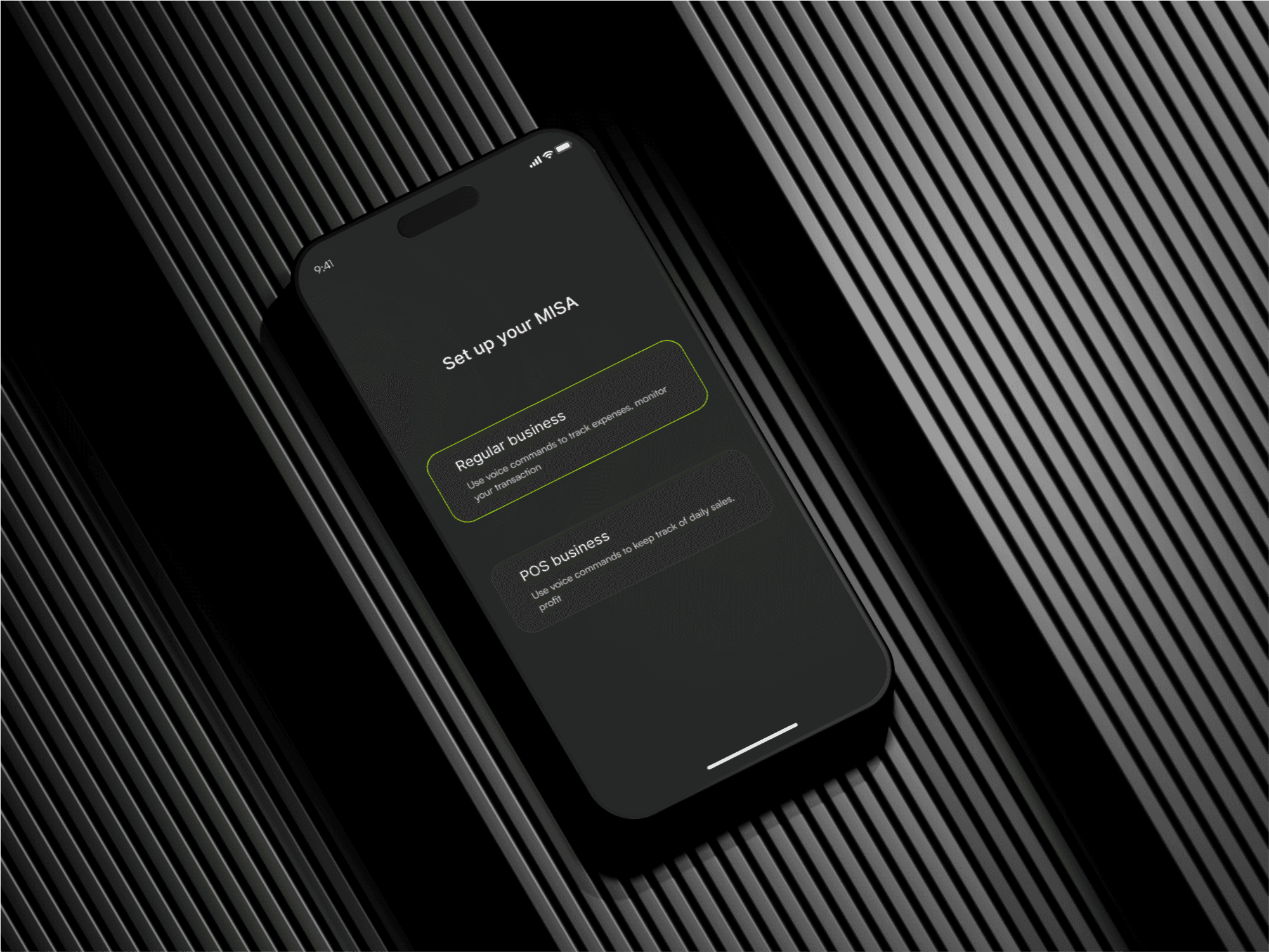
The Decision That Defined the Product
With my research in hand, the core design decision became clear, and it was a deliberate constraint, not a feature.
Our users weren’t unfamiliar with their phones, but they weren’t power users either. Complex interfaces had failed them before. So instead of building another app that also had voice as an option, we made voice the primary interface — modelled on something they already trusted: a phone call.
That framing changed everything. It meant:
The onboarding couldn’t rely on visual walkthroughs, it had to teach through conversation
Error states had to be handled verbally, with clear, friendly re-prompts
The “confirmation” of a logged transaction needed to feel like acknowledgement, not a system message
The visual UI still existed, for viewing reports, checking history, seeing trends. But the input layer, the part the user touched every single day, was voice-first. A POS operator could say “I sold 3 bags of rice for 4,500 naira” and the app would log it, update her inventory, and confirm back, all without her looking at a screen.
The Decision That Defined the Product
With my research in hand, the core design decision became clear, and it was a deliberate constraint, not a feature.
Our users weren’t unfamiliar with their phones, but they weren’t power users either. Complex interfaces had failed them before. So instead of building another app that also had voice as an option, we made voice the primary interface — modelled on something they already trusted: a phone call.
That framing changed everything. It meant:
The onboarding couldn’t rely on visual walkthroughs, it had to teach through conversation
Error states had to be handled verbally, with clear, friendly re-prompts
The “confirmation” of a logged transaction needed to feel like acknowledgement, not a system message
The visual UI still existed, for viewing reports, checking history, seeing trends. But the input layer, the part the user touched every single day, was voice-first. A POS operator could say “I sold 3 bags of rice for 4,500 naira” and the app would log it, update her inventory, and confirm back, all without her looking at a screen.
What Shipped
The final design centred on three things:
A natural onboarding flow — Designed to introduce Misa (the AI) as a character, not a feature. The first-time experience felt like meeting someone helpful, not setting up software.
A voice-first transaction layer — Users could log sales, check balances, and ask for summaries entirely through speech. The AI was designed to handle natural, imperfect language — not rigid commands.
A visual reporting layer — Simple, scannable dashboards for when users did want to see the bigger picture. Designed for quick comprehension, not deep analysis.
What Shipped
The final design centred on three things:
A natural onboarding flow — Designed to introduce Misa (the AI) as a character, not a feature. The first-time experience felt like meeting someone helpful, not setting up software.
A voice-first transaction layer — Users could log sales, check balances, and ask for summaries entirely through speech. The AI was designed to handle natural, imperfect language — not rigid commands.
A visual reporting layer — Simple, scannable dashboards for when users did want to see the bigger picture. Designed for quick comprehension, not deep analysis.
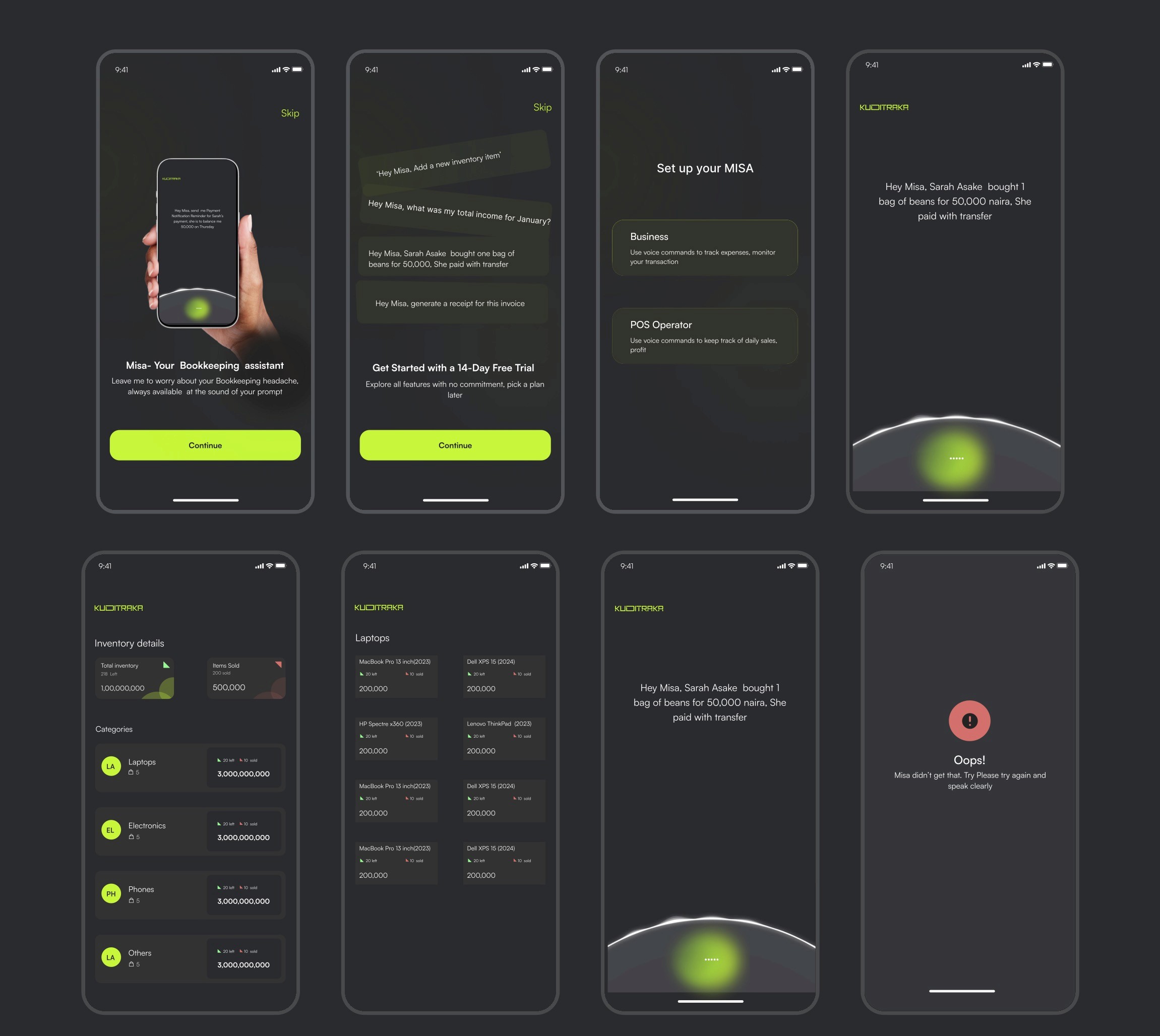
Result
Result
A shipped design with a voice-first transaction layer, a natural onboarding that introduced Misa as a character rather than a feature, and a visual reporting layer for when users wanted to see the bigger picture. The waitlist of 100+ users validated that real demand existed — my job was making sure the product could deliver on the promise they’d already bought into.
A shipped design with a voice-first transaction layer, a natural onboarding that introduced Misa as a character rather than a feature, and a visual reporting layer for when users wanted to see the bigger picture. The waitlist of 100+ users validated that real demand existed — my job was making sure the product could deliver on the promise they’d already bought into.
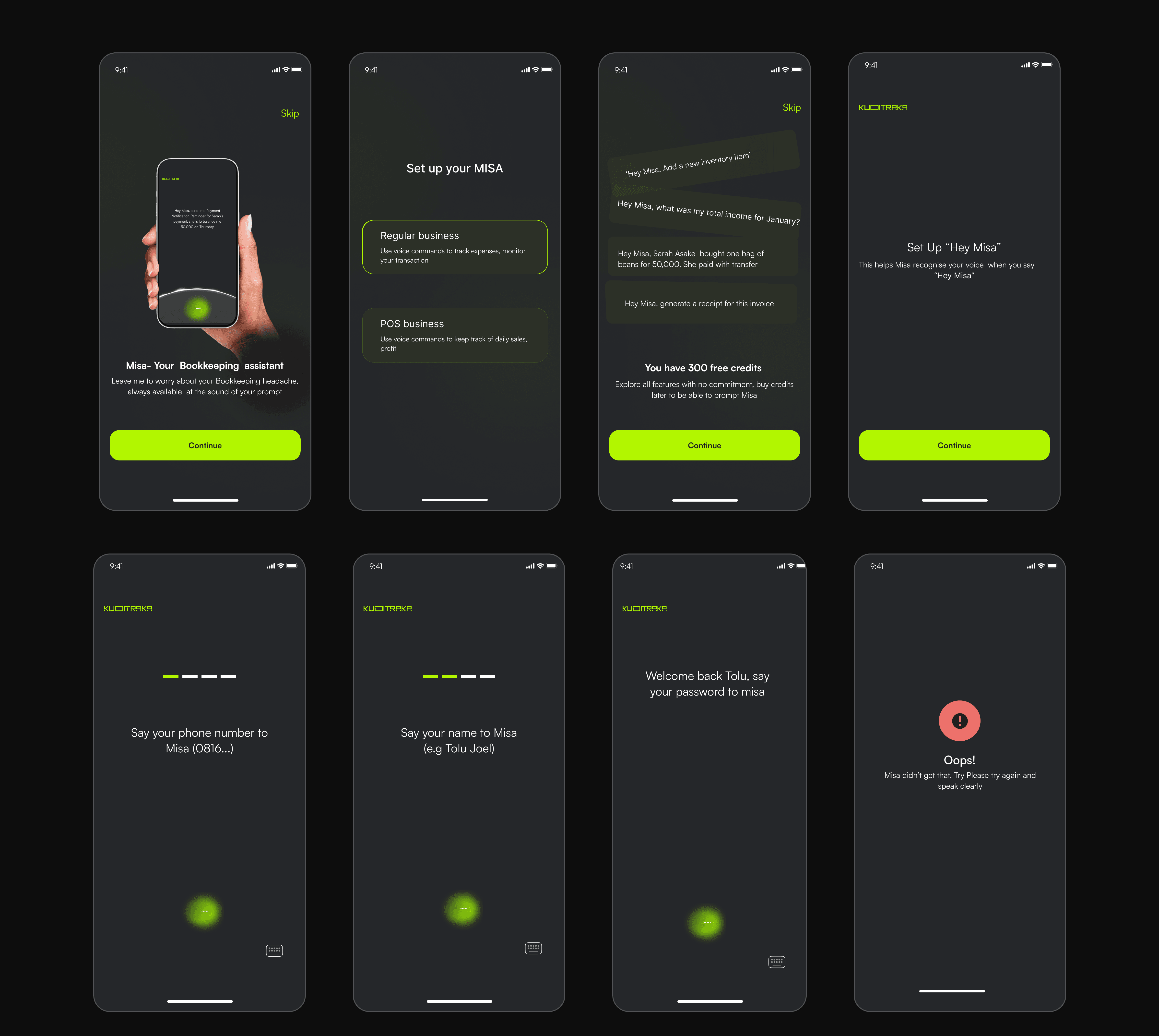
A few selected screens showcasing the final UI design of the Misa AI app.
What I Took Away
Designing for voice means designing for trust. There’s no visual scaffolding to fall back on — if the conversation breaks down, the experience breaks down. And sometimes the most powerful design decision is to reach for something familiar and make it work harder than it ever has.
What I Took Away
Designing for voice means designing for trust. There’s no visual scaffolding to fall back on — if the conversation breaks down, the experience breaks down. And sometimes the most powerful design decision is to reach for something familiar and make it work harder than it ever has.